Продолжай революцию с главного экрана!
Continue the revolution from your home... screen!
Why queue up for your dictionary like it’s дефици́тные това́ры? Slovarish uses Progressive Web App technology, which means you can install it on your phone like any other app — no App Store required, no waiting in browser tab lines.
What you get
- Lightning-fast access — straight from your home screen, with a single tap
- Full-screen experience — all dictionary, no address bars or browser clutter
- Feels like a real app — smooth animations and native-style navigation
- Always up-to-date — no need to update manually
- Works everywhere — Android, iPhone, even в ко́смосе!
You’ll still need internet to look up words (this isn’t an offline dictionary), but everything else works just like the apps you already love. Plus, you’re supporting the open web instead of corporate app stores!
How to install
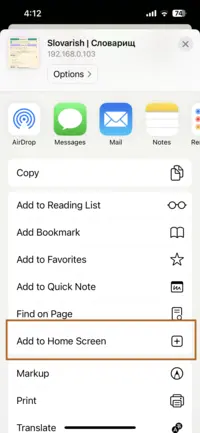
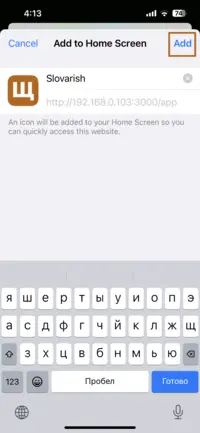
Safari
- Tap the Share button
- Scroll down to Add to Home Screen
- In the following popup, tap Add

Chrome
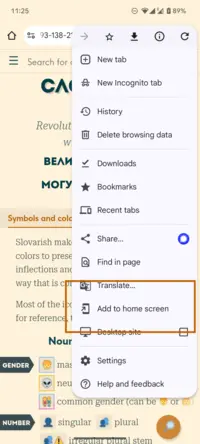
- Open the three-dot menu
- Tap Add to Home screen
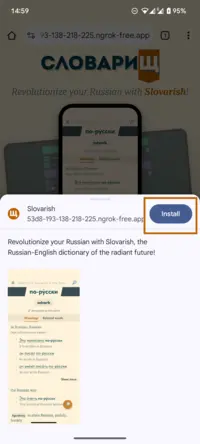
- In the following popup, tap Install

Samsung Internet / Firefox
- Open the three-dot menu
- Tap Add to Home screen
Edge
- Open the three-dot menu
- Tap Apps
- Tap Install this site as an app